







「跟小時候的自己合照」怎麼做?Gemini AI 合成教學&指令全公開!

最近有沒有注意到 Threads 等平台上突然掀起一波「跟小時候的自己合照」的熱潮?大家都在把現在的自己和小時候的照片合成,效果懷舊又可愛!你也想跟童年時期的自己同框嗎?這篇文章會提供三種 AI 合成合照的指令,並示範如何搭配「」讓照片動起來,幾秒鐘就能跟小時候的自己互動。
AI 小時候合照是什麼?
近期這波「跟小時候的自己合照」的 AI 合成應用來自美圖秀秀的新內建範本,使用者只要上傳兩張照片,就能生成多種有趣的合照風格,例如最夯的 y2k 電梯合照、紅色/白色背景仰拍,以及拍立得風格合照。除了跟偶像或親人合照之外,網友們也發揮創意,將自己的童年照片拿來玩合照,成果十分逼真又有趣!

AI 小時候合照指令:拍立得
指令:Take a Polaroid-style photo with a casual, candid feel. The image should have slight motion blur and even lighting, like a flash in a dark room, softly spread across the scene. Keep the faces unchanged. Replace the background behind the two subjects with a white curtain. The adult and the child should be naturally close, with gentle physical contact, such as leaning together or resting a shoulder against each other.

AI 小時候合照指令:電梯仰拍
指令:Create a composite photo of an adult and a child inside a metallic, brightly-lit elevator with a Y2K vibe. The child stands at the front-left, facing the camera with a natural, cheerful expression. The adult is positioned slightly behind to the right, looking at the child with a warm smile, and naturally resting one hand on the child’s shoulder. Both faces should retain the features of the uploaded photos for realism. The shot must be from a wide-angle, high-angle perspective, as if taken from the top corner of the elevator, making the adult appear taller and emphasizing the unique "elevator high-angle shot" style. The photo should look like a real phone snapshot, with natural skin tones, reflective elevator walls, subtle flash lighting, and detailed light and shadow for an authentic Y2K atmosphere.

AI 小時候合照指令:紅背景自拍
指令:These two photos are of the same girl, one as a child and one as her grown-up self. Please merge the two photos into a single image, where the grown-up version gently places her arm around the child’s shoulder, and they stand together taking a selfie in a red space. The background should be a vivid red wall. The photo should be shot with a wide-angle lens from a low angle, looking upward, as if taken with a real smartphone. Both should be looking directly at the camera, with facial features remaining as close as possible to the original photos. The final image should look highly realistic.

AI 小時候合照動起來
生成完小時候合照之後,有沒有得到可愛又滿意的結果呢?如果你想更進一步,讓照片動起來,增加互動感,就可以使用 MyEdit 的「」功能。只要自訂文字指令,就能讓你和小時候的自己一起揮手、微笑或做出各種互動動作,瞬間讓合照變成生動的小短片!
AI 小時候照片動起來教學
- 前往 MyEdit,選擇「」功能。
- 上傳你先前用 AI 工具生成的合照,並設定影片長度與畫面比例。
- 輸入影片的描述,確認設定沒問題後點選「生成」。
- 稍等片刻,MyEdit 就會自動產出動態合照。喜歡生成的影片的話,按影片右上角的「下載」圖示就可以保存於裝置內囉!


✏️例如下圖:「兩人自拍時開心對視,並對手機揮揮手」。描述越具體,AI 生成結果會越接近你的想法。接著,點按「生成」,系統將準備作品,每次生成需要 15 點點數。


也可以參考以下手機版的 30 秒操作教學影片,教你用客製化指令或範本讓小時候合照動起來:
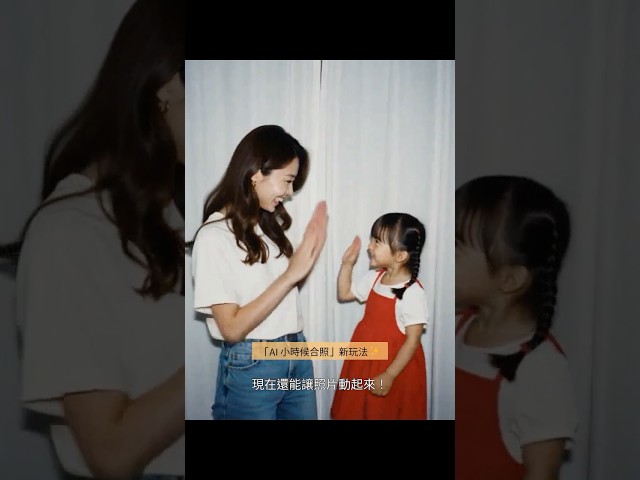
除了自訂指令之外,MyEdit 的「AI 照片動起來」功能可以讓你一鍵套用不同雙人範本,例如擁抱、比愛心、親臉頰、打架等情境。不需輸入任何指令,只要上傳照片、點選風格,系統就會自動生成動畫影片,非常方便!

MyEdit 也提供超過 100 種內建範本,能輕鬆製作 IG、Tiktok 上超夯的的流行短片,推薦可以玩玩看!

⚠️ 在使用 AI 創作時,請盡量避免生成涉及肖像權或智慧財產爭議的內容,例如將名人偶像與自己合成親密互動等情境。若生成此類作品,請務必註明為 AI 創作,以免造成誤導。建議以自身素材進行創作或使用授權圖片,確保在合法、安全的範圍內發揮創意,並以正確態度使用 AI 工具。
「跟小時候的自己合照」常見問題
最簡單的方法是使用美圖秀秀內建的合照範本,一鍵就能完成。不過若你想要更自由的效果,也可以用 Gemini 或豆包 AI 來合成。只要上傳一張自己的近照,再加上一張小時候的照片,搭配合適的指令,就能生成跟小時候的自己合照。
以紅色背景效果做舉例,指令為:"These two photos are of the same girl, one as a child and one as her grown-up self. Please merge the two photos into a single image, where the grown-up version gently places her arm around the child’s shoulder, and they stand together taking a selfie in a red space. The background should be a vivid red wall. The photo should be shot with a wide-angle lens from a low angle, looking upward, as if taken with a real smartphone. Both should be looking directly at the camera, with facial features remaining as close as possible to the original photos. The final image should look highly realistic."(性別自行更改)
在 Gemini 中,選擇 Nano Banana 模型,並上傳兩張照片:一張是現在的你,一張是小時候的你。參考指令如下:"Take a Polaroid-style photo with a casual, candid feel. The image should have slight motion blur and even lighting, like a flash in a dark room, softly spread across the scene. Keep the faces unchanged. Replace the background behind the two subjects with a white curtain. Two people should be naturally close, with gentle physical contact, such as leaning together or resting a shoulder against each other."
電梯合照形式多種,以下指令為溫馨且有搭肩的,可再依照需求修改:"Create a composite photo of an adult and a child inside a metallic, brightly-lit elevator with a Y2K vibe. The child stands at the front-left, facing the camera with a natural, cheerful expression. The adult is positioned slightly behind to the right, looking at the child with a warm smile, and naturally resting one hand on the child’s shoulder. Both faces should retain the features of the uploaded photos for realism. The shot must be from a wide-angle, high-angle perspective, as if taken from the top corner of the elevator, making the adult appear taller and emphasizing the unique "elevator high-angle shot" style. The photo should look like a real phone snapshot, with natural skin tones, reflective elevator walls, subtle flash lighting, and detailed light and shadow for an authentic Y2K atmosphere.."


